On this page
What to do with a never-ending to-do list
Old tasks pile up because each one is a plan you once made. How to give each a new day, move it to Someday, or let it go.
Alex Tinyaev · · 4 min readStop trying to finish a never-ending to-do list. Once a week, go through the old tasks one at a time and decide on each. Give it a real day, move it to a Someday list, or let it go. Then plan today from a few tasks you chose, and keep the long list out of view.
Why does my to-do list keep growing?
When I finally looked at all my open tasks, there were 839, and 56% of them were more than a year old. That day I wrote that the list was garbage and that I didn’t want to lose anything.
Every one of those tasks was a plan I made once, for a reason that made sense at the time. Adding a task takes a few seconds, and my apps never asked me to decide on it again. Tasks with a date rolled into overdue. Tasks without one sank down the list. Task apps also treat a date as a plan, so a dated task lands on Today whether or not that day has room for it.
The list also mixes two kinds of tasks. Some are work you still mean to do. Others are things you wanted once, like a course or a side project. You keep those because deleting them feels like giving up.
How do I decide which old tasks to keep?
Take one task at a time and ask whether it is still you. I phrase the question that way because so many old tasks describe someone I meant to become, and the question makes that easy to see. If you would start it this week, give it a real day. If you might want it one day, move it to Someday. If neither is true, let it go. A task that is stuck on another person can go on a waiting list, with a date to check back.
With a list as long as mine was, group the tasks by area first, so you decide on similar tasks together. Start with the oldest ones.
A real day means a date you intend to keep. In lab experiments published in 2011, E. J. Masicampo and Roy Baumeister found that an unfinished goal intruded on people’s thoughts and got in the way of a later task, and that a specific plan for the goal removed both effects. In one study in the same paper, the people whose intrusions stopped were the ones who went on to carry out their plan. A date you have already pushed three times is probably not that kind of plan.
Where should Someday tasks go?
Someday is for things you might want later but won’t plan now. David Allen’s Getting Things Done keeps a Someday/Maybe list for this, and the official GTD site says to look at it in your weekly review. Without that weekly look, Someday turns into a second never-ending list.
The Bullet Journal adds friction on purpose. In its method, you copy unfinished tasks by hand into each new month. Its creator, Ryder Carroll, gives the test on the same page: “If an entry isn’t worth the effort to rewrite, then it’s probably not that important.” Task apps carry every task forward for free, so in an app you have to make that weekly pass yourself.
What if I let go of something I need later?
That was my worry too. So before letting anything go, I had the whole list grouped into 17 areas and saved into notes. Then I let go of 170 tasks. I haven’t needed any of them back.
If you share the worry, save a copy first. Paste the tasks you let go into one note you can search later.
New requests are the other way a list grows, and I wrote about those in How to stop overcommitting your day. Once the old tasks are sorted, plan each day from three of them, as in the Daily Big 3.
How Compass does this
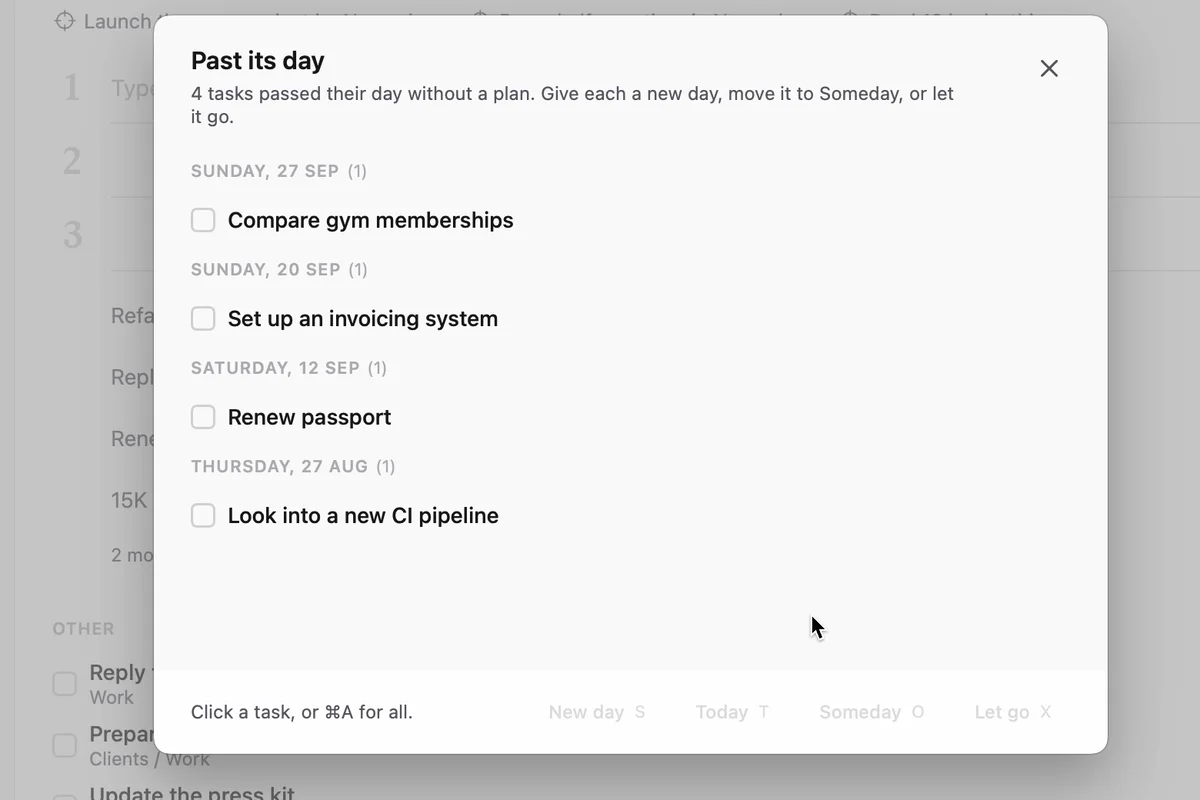
In Compass, a task whose day passed without a plan moves to one list, Past its day, with a single line on Today. Give each task a new day, move it to Someday, or let it go. A task you let go stays in the Logbook. A date also no longer puts a task on your plan by itself. Dated tasks wait under “Dated for today” until you add them.